Google Maps Leads Extractor
Automate lead generation with a Google Maps Leads Extractor. Find local businesses, collect data, and export results for marketing and sales campaigns.

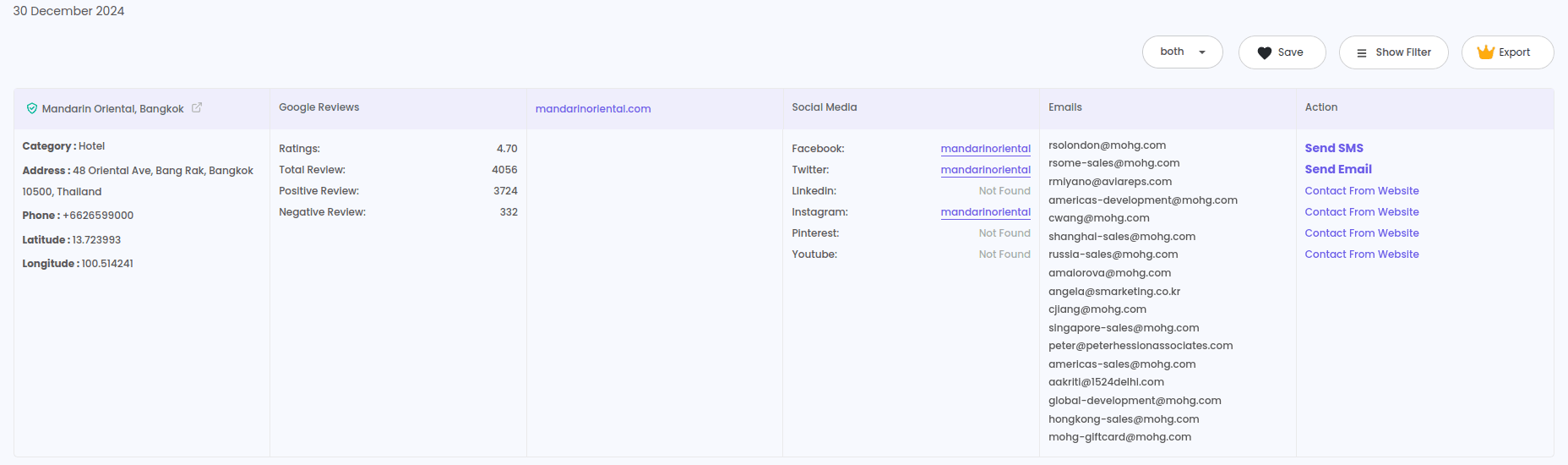
Google Maps Leads Extractor is a powerful tool designed to collect business information directly from Google Maps. It allows users to extract details such as business names, phone numbers, addresses, websites, ratings, and social media. This data can be crucial for businesses aiming to build targeted marketing lists and reach potential customers effectively. By simplifying the lead generation process, it saves time and effort while improving marketing strategies.

The G Maps Leads Extractor provides businesses with access to accurate and up-to-date contact details of potential leads. Whether you are looking to expand your client base or target specific industries, this tool enables you to filter searches based on categories, locations, and keywords. Its user-friendly interface and automated data collection ensure efficiency, helping businesses connect with relevant prospects and grow their networks.
With Google Maps Extractor, businesses can automate lead generation and focus more on closing deals. The extracted data can be exported into formats like Excel or CSV, making it easy to organize and analyze. This tool is ideal for marketers, sales teams, and entrepreneurs who need a steady stream of leads to fuel their growth. By leveraging its advanced filtering and extraction capabilities, businesses can boost their marketing ROI and stay ahead of competitors.
What is Google Maps Lead Extraction?
Google Maps lead extraction involves collecting business information from Google Maps listings. This data typically includes business names, addresses, phone numbers, websites, email addresses, and customer reviews. By extracting and analyzing this information, businesses can build targeted contact lists, understand market demographics, and tailor their marketing strategies accordingly.
Why is it Important?
Access to detailed business information enables companies to:
Enhance Lead Generation: Identify and reach out to potential clients within specific industries or locations.
Conduct Market Research: Analyze competitors and market trends to make informed business decisions.
Improve Sales Strategies: Develop personalized sales pitches based on the specific attributes of target businesses.
Benefits of Using Google Maps for Lead Generation
Unlock Business Growth Effortlessly Google Maps Extractor is a powerful tool designed to help businesses collect valuable contact details and location-based data for lead generation. With easy-to-use features and no coding required, it simplifies the process of extracting data from Google Maps. This blog explains how the tool works, its benefits, and why businesses should integrate it into their marketing strategies.
Access to Accurate Business Information
Google Maps provides up-to-date details like business names, addresses, phone numbers, and websites, ensuring reliable data for lead generation.
Location-Based Targeting
Businesses can target specific geographic areas to find potential leads, making marketing efforts more focused and effective.
Improved Sales Prospecting
With data on ratings, reviews, and categories, businesses can identify high-potential leads and prioritize outreach.
Cost-Effective Data Collection
No-code tools eliminate the need for expensive software and developers, making lead generation affordable for startups and small businesses.
Scalability
Extract data in bulk to scale up marketing campaigns quickly and efficiently.
Methods of Extracting Leads from Google Maps
1. Manual Extraction
Manually copying and pasting information from Google Maps into a spreadsheet. This method is time-consuming and prone to errors, making it less efficient for large datasets.
2. Automated Extraction Using Tools
G maps extractor Utilizing specialized software or extensions to automate the data extraction process. These tools can quickly gather large amounts of data with minimal effort.
Why Use Google Maps Leads Extractor?
In today’s competitive market, businesses need reliable tools to collect leads quickly and efficiently. A Google Maps scraper tool is perfect for this purpose, offering detailed information about businesses listed on Google Maps. Users can extract business names, phone numbers, email addresses, websites, and ratings without manual effort.
Features of Google Maps Leads Extractor
1. User-Friendly Interface
No coding is required, making it ideal for marketers, sales teams, and small business owners.
2. Bulk Data Scraping
Extract thousands of leads in just a few clicks using the Google Maps scraping tool.
3. Custom Search Filters
Apply filters such as location, ratings, and categories to narrow down results.
4. Export Options
Download data in multiple formats like CSV and Excel Sheets for easy integration with CRM systems.
5. Automated Scraping Software
Automate repetitive tasks and save time with a fully automated process.
How to Use a Google Maps Leads Extractor
How to Install Google Maps Scraper & Extractor Chrome Extension ?
How to Use Google Maps Scraper & Extractor Chrome Extension ?
Sign Up and Install the Tool
Choose a trusted provider like LeadStal Google Maps Scraper and set up your account. Install the required browser extension or application.
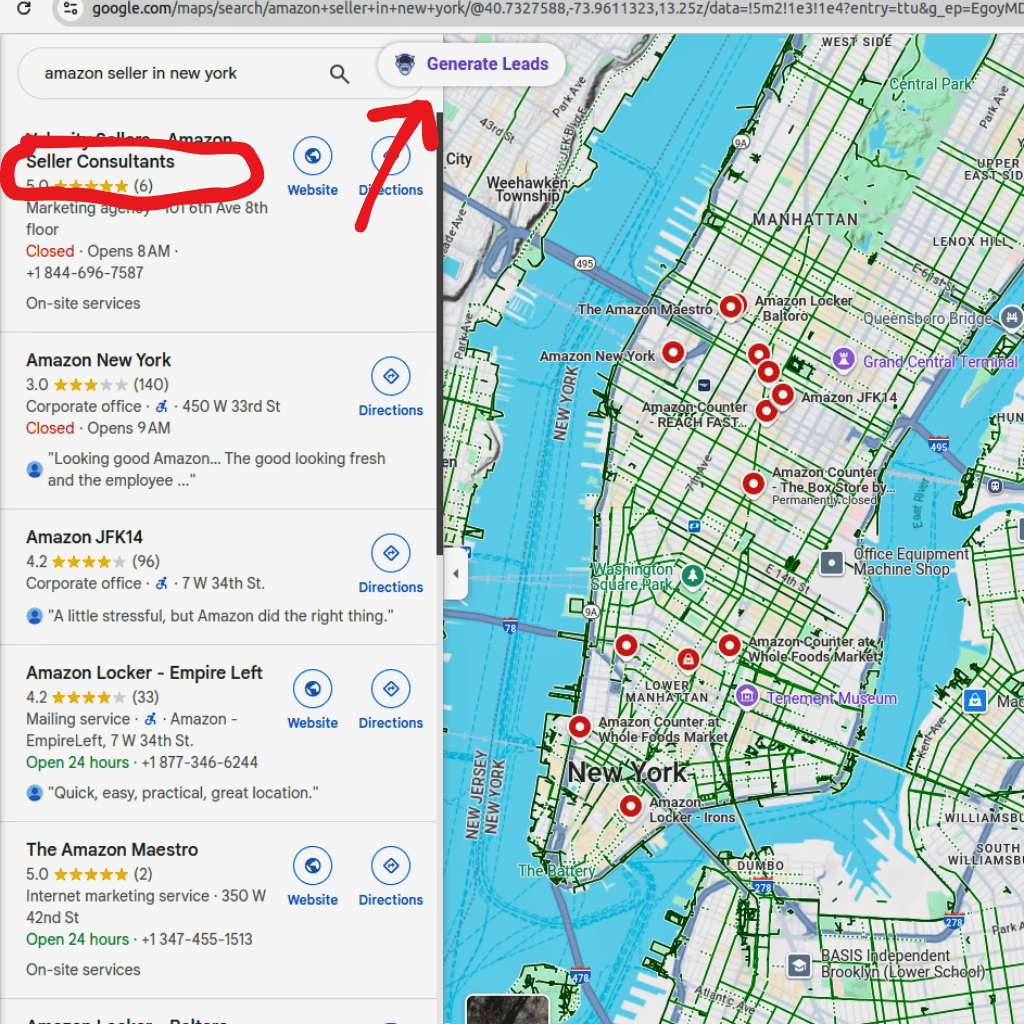
Input Search Criteria
Enter keywords such as "restaurants in New York" or "plumbers in Los Angeles." Filter results by category, rating, or business type.
Start Data Extraction
Launch the extraction process and monitor progress in real time.
Export Data
Download the collected data in your preferred format, such as Excel files or CSV files.
Use Data for Marketing
Integrate extracted data with email marketing campaigns or lead generation platforms to connect with potential customers.
Advantages of Using a Google Maps Scraping Tool
1. Faster Lead Collection
Automates data extraction, saving time compared to manual methods.
2. Cost-Effective Solution
Affordable plans make it accessible for startups and small businesses.
3. Accurate and Updated Data
Get the latest business information, ensuring higher conversion rates.
4. Scalability
Extract data in bulk without limitations, helping scale marketing efforts.
Use Cases for Google Maps Leads Extractor
- Local SEO Optimization – Improve targeting by gathering location-specific leads.
- Competitor Analysis – Monitor competitors’ presence and customer feedback.
- Sales Prospecting – Build contact lists for direct sales outreach.
- Market Research Tools – Analyze business density and service demand in specific areas.
- Data Mining Software – Gather comprehensive datasets for analytical purposes.
Choosing the Right Google Maps Data Extractor
When selecting a Google Maps data extractor, consider the following factors:
- Ease of Use – Tools like LeadStal provide a simple setup and navigation.
- Automation Features – Look for features that handle repetitive tasks with minimal supervision.
- Export Flexibility – Ensure the tool allows exports in formats compatible with CRM and email marketing platforms.
- Customer Support – Reliable support can assist with troubleshooting and optimization.
- Affordability – Opt for tools that provide value without high costs.
Conclusion
A Google Maps Leads Extractor is an essential tool for businesses looking to expand their outreach, enhance sales prospecting, and optimize marketing strategies. With tools like LeadStal, users can collect accurate and updated business data effortlessly, making it easier to generate leads and analyze markets.
Whether you need to build contact lists, conduct market research, or monitor competitors, Google Maps scraping software provides a cost-effective and scalable solution. Get started today and take your business growth to the next level!
Frequently asked questions
1. What is a Google Maps Scraper?
A Google Maps Scraper is a tool or software designed to extract data from Google Maps. It can collect details such as business names, addresses, phone numbers, websites, reviews, ratings, and coordinates.
2. How Does a Google Maps Scraper Work?
A Google Maps Scraper works by automating searches on Google Maps, fetching data from the results, and organizing it into a spreadsheet or database format. It uses web scraping techniques.
3. Is it Legal to Use Google Maps Scrapers?
Using a Google Maps scraper depends on how the data is obtained and used. Scraping publicly available data for research or analysis may be acceptable, but scraping large amounts of data for commercial purposes may violate Google’s Terms of Service.
4. What Information Can Be Extracted Using a Google Maps Scraper?
Business Name Address Phone Number Email Address (if available) Website URL Ratings and Reviews Latitude and Longitude Coordinates
5. Can I Export Google Maps Data to Excel?
Yes, most Google Maps Scrapers allow users to export data directly to Excel (CSV) or other file formats for easy access and analysis.
6. What is a Google Maps Email Extractor?
A Google Maps Email Extractor is a specialized tool designed to extract email addresses listed on Google Maps business profiles, which can be useful for lead generation and marketing purposes.
7. How Accurate is the Data Extracted from Google Maps?
The accuracy depends on the tool being used. Most scrapers provide real-time data, ensuring the information is up-to-date, but errors can occur if businesses have outdated or incomplete profiles.
8. Do Google Maps Scrapers Provide Latitude and Longitude Coordinates?
Yes, many Google Maps Scrapers include latitude and longitude coordinates for each location, making them ideal for geolocation-based applications.
9. Can I Use a Google Maps Scraper for Lead Generation?
Absolutely. Many businesses use these tools to generate leads by extracting contact details, such as phone numbers and email addresses, directly from Google Maps listings.
10. Can I Scrape Google Maps for Free?
There are some free scraping tools and Chrome extensions, but they often have limits on the amount of data you can extract. For larger datasets, premium tools are recommended.
Put this into action, for free
Find verified leads from Google Maps, Instagram and 30+ sources with LeadStal's free tools.
Start finding leads freeComments (3)
 Priya Nair· 2 days ago
This is exactly what I needed, pulled 300 leads in my niche the same afternoon. The export to CSV worked flawlessly.